Review Comments (1) Screenshots (7) Questions & Answers (0) Votes (5) Awards (9) Wiki  
(5)
6.2.3.3
www.codedcolor.com
Shareware
$35.00  Purchase
898 people
Download CodedColor...

44.21 MBDownloaded 215 times

This software was checked for viruses and was found to contain no viruses.
Click here to see antivirus report.
 
Video tutorial for CodedColor PhotoStudio 6.2
Frame

Review

CodedColor PhotoStudio is a free, time-limited version of the well-known CodedColor PhotoStudio Pro. However, the functionality is the same, so that you can still fully edit your digital photographs and images, correct exposure errors, enhance their color, add attractive effects, tag your image files, and watch them as a slideshow.

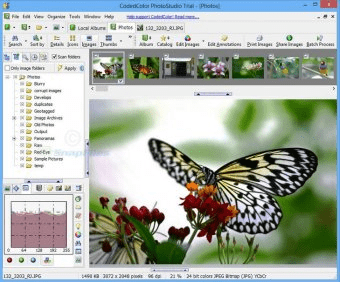
The layout of the interface provided is based on a series of panels that will help you to have all the basic editing tools always at hand without losing important information about the active album and the image you are working with. Thus, when opening CodedColor PhotoStudio you will see a panel with a useful file tree to help you find your photographs more quickly, another panel with information about the file selected, a third panel with the thumbnails of all the images present in the folder selected, and a big panel that will show you the active image in its full size.

The program offers you a series of useful cataloging tools for you to organize your photo collections. On one hand, you have tools to tag your files, using well-known standards, such as EXIF and IPTC. On the other hand, PhotoStudio gives you an album-based catalog structure that will allow you to organize and store your photographs in a more logical way.

When it comes to editing, enhancing, and retouching your image files, the possibilities are nearly endless. It claims to be simpler to use than Photoshop, but the number of tools available makes it even comprehensive. To help novice users to make the most of CodedColor PhotoStudio, a Basic Editing Tool has been also included. This will let you correct the contrast, the gamma levels, the sharpness, and the RGB values (to name a few) the easy way – a combination of convenient slide controls with real-time viewing of all the changes made.

I think its useful and intuitive batch conversion utility is also worth mentioning. Here you can select a number of actions, change their settings to fit your preferences, and leave the program to do all the hard work for you. Among other features, you can change the size, the quality, the color and white balances, the exposure values, and the EXIF values of a large number of pictures, all in one single operation.
  • Extensive list of features and editing tools.
  • Its multi-panel interface provides higher flexibility.
  • Excellent image conversion quality.
  • None.

Reviewer rating:

Reviewed: 3 months ago

What's new in version 6.2

05/02/2011: CodedColor 6.2.3

New Features & Improvements
- Thumb generation is now threaded, leading to BIG speed improvements in folders that are viewed for the first time
- Overall improved response times in the Explorer
- CodedColor is now fully video compatible. We recommend that you install the free K-Lite Codec Pack in order to fully use this feature and improve loading speed and viewing quality. See the FAQ for more infos on DirectShow and K-Lite.
- New supported video filetypes: FLV, MOV, RM, DIVX, MPEG4, MTS
- Video Codes of current file are displayed
- Pipette improved in all paint and fill functions
- Color replacement brush now with option to replace grayscale texture or paint in b/w
- Improved panning in the Panorama Viewer
- Several new features and bug fixes in the Publisher
- "Save as" in the image editor now has a shortcut
- New menu item in Explorer: Copy a downsized image directly to the clipboard (no need to downsize in the image editor, to paste images into an email)
- Panorama Viewer now creates a link for every opened image and remembers the settings for each panorama
- "View Panorama" shortcuts in the Explorer and Image Editor
- Timeline search values in the Explorer now support AND/OR
- Delete image: removed "beep" sound
- CTRL+P now opens print dialog
- Default sizes in print dialog now adapt to portrait/landscape images
- Option for fullscreen usage of mouse wheel: scroll images / zoom image
- File association handling improved for Vista and Windows 7
- Yellow coloring darkened for image folders under Windows 7

Fixed bugs
- Attention: bug in Batch Renaming fixed, where files could disappear. Please use this feature in older versions at your own risk and in combination with backups!
- Duration is now only displayed in the Explorer description column after loading the corresponding video file, improving loading speed
- ESCAPE key now also closes screenshow for video files
- Fixed bugs in media toolbar
- Some thumbs displayed with transparency in black/white areas
- Custom sorting not performed in destination folder when dragged to tree
- Inifile can get disrupted in UNICODE environments
- GPS dialog does not work, if time zones cannot be retrieved from registry
- Tabset captions are barely visible in Windows 7
- Image comparison toolbar can disappear when using a 2nd monitor
- Error in custom sorting
- When changing a folder in the Explorer, the first image is sometimes not selected
- Recursive thumb creation in the Explorer after dragging
- Fullscreen: no more broken links shown in the navigation panel at the top
- Folder with movies could not be renamed due to locking problem
- Movie files could not be renamed (locked)
- Batch conversion: delete size suffix, if resizing is deactivated
- Exception after returning from fullscreen and image sound file
- Fixed serious DB index problem resulting from empty records
- CodedColor sometimes lost focus when a dialog is closed
- Fixed several other minor bugs
Report a wrong version Report a wrong program title Suggest a correction

Screenshots

Main Interface Main Interface EXIF Information EXIF Information Image Editor Image Editor Screenshow Screenshow
All 7 screenshots

Latest comments

LeeYongKyu(beginner) Last year 
Has many features
But loading speed is very fast the first time.
Reply
Add new comment

E-mail Address:

Password:

Register now »

Forgot password?

Sign in with:
Facebook Account
Download Software Informer Client
Copyright © 2012, Informer Technologies, Inc. About| Terms & Privacy| FAQ| Feedback & Support| For Developers